Creating a Second Gmail Account? Here's What You Need to Do

Learn how to create a second Gmail account quickly and securely. With our easy guide, you'll manage multiple Gmail accounts easily.
Table of contents
- Why does anyone need a second Gmail account?
- Creating a second Gmail account: step-by-step guide
-  **Is it possible to link my second Gmail account to the main one?**
- Why pay for Google Workspace if Gmail is free?
- Is there an alternative to creating a second Gmail account?
- Comparing email solutions for teams: free Gmail vs Google Workspace vs DragApp
- How to benefit from a second Gmail account?
- What you need to know about second Gmail accounts
- Frequently asked questions
Managing multiple Gmail accounts can make your personal and professional emails much easier to organize. However, the process of creating a second Gmail account, including linking it to your main one, should be done properly so that you can centralize communication. In this guide, we’ll walk you through each step, tips for keeping the inbox secure, alternative options (if creating a second Gmail account isn't the ideal solution and help you learn how to manage multiple Gmail addresses. Google Workspace and Gmail, for both individuals and teams, offer a myriad of tools and apps to streamline productivity, collaboration, and communication.
Why does anyone need a second Gmail account?
Creating a second Gmail account can be a strategic move for professionals and businesses. Here’s why:
1. Separate work and personal messages
-
Entrepreneurs and small business owners can distinguish business emails from personal messages
-
Categorizing inboxes keeps you from missing important client emails among personal updates
2. Team and project management
-
A company leader may create different Gmail accounts for separate projects, which helps with tracking and organization
-
Streamline communication with direct addresses, such as sales email, a helpdesk email and so on
3. Enhanced security
-
Users may prefer to create a dedicated account for signing up for business apps or services to mitigate data leak risks
-
Avoid letting spam attempts or overactive marketing newsletters take over your main account inbox
4. Campaign tracker
-
Keep promotional emails and newsletters separate from direct client communication
-
Makes tracking and reporting easier for business purposes
5. Testing new resources
-
Test email templates, campaigns, or integrations without affecting your main inbox
-
Create separate accounts for side projects and limited-time actions
By creating a second Gmail account for business use, you can stay organized, secure, and more efficient while managing multiple responsibilities.
Creating a second Gmail account: step-by-step guide
Setting up a second Gmail account doesn’t have to be complicated. Whether it’s for work, a side project, or keeping things organized, you can get a new account ready in just a few minutes. Follow these simple steps, and you’ll be managing multiple Gmail accounts easily and securely. Listed below are the steps for creating another Gmail account:
- Locate the Gmail app on your tablet or phone (the multicolored ‘M’ icon)
- Do you see your initials or profile picture in the top-right corner? Click on it
- Select Add another account once you see the menu expand
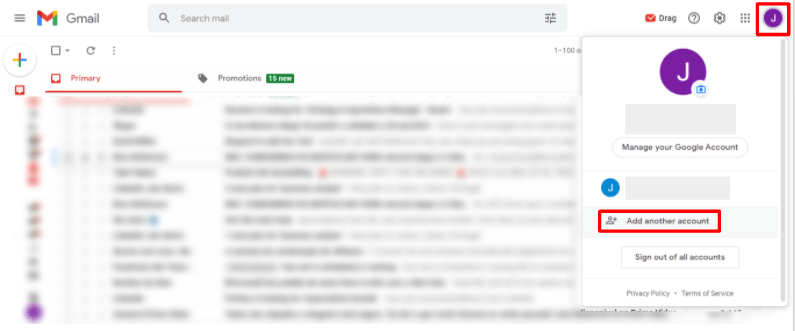
- On your web browser window, a Google sign-in screen should appear
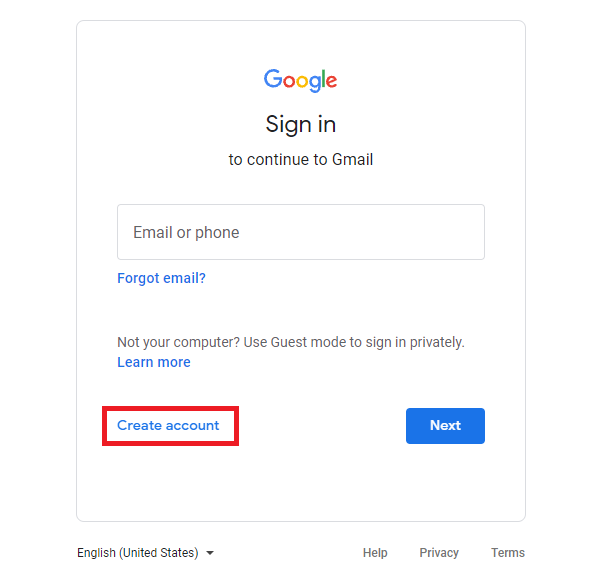
- Now, click Create account in the subsequent step
How can I create a second Gmail account for business?
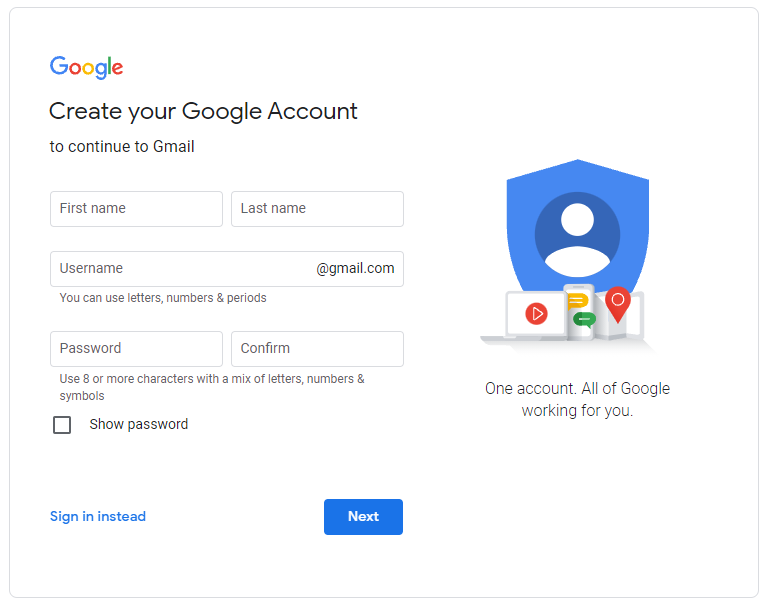
During the setup process, Google will now prompt you to select whether you’re creating a second Gmail account for personal use (‘For myself’ as the option) or for business use (‘To manage my business’ as the second option). If you choose the latter, you’ll be redirected to Google Workspace. This is where you’ll need to set up a Google Workspace account (that starts at $6 a month per user). You can check our full guide about creating a business Gmail account. Related Post: How to Create Gmail Account Without Phone Number
Can I create a free second Gmail account?
Yes, you may choose to create a free secondary Gmail account by opting for a personal account instead. In this alternative, all you need to do is enter your first name, surname, birthday, and gender in their respective fields. Next, you can either choose one of the suggested email addresses or create your own. Make sure you create a strong password (and change it periodically). To ensure maximum security, turn on two-factor authentication by verifying your phone number.
 Is it possible to link my second Gmail account to the main one?
Yes, after creating a second Gmail account, you can link it to the main one. Merging multiple Gmail accounts into one inbox is possible through a quick setup process:
How do I send emails as a secondary account?
- Open your primary Gmail account and navigate to Settings
- Click See all settings and head over to the Accounts and import tab
- Select Import mail and contacts
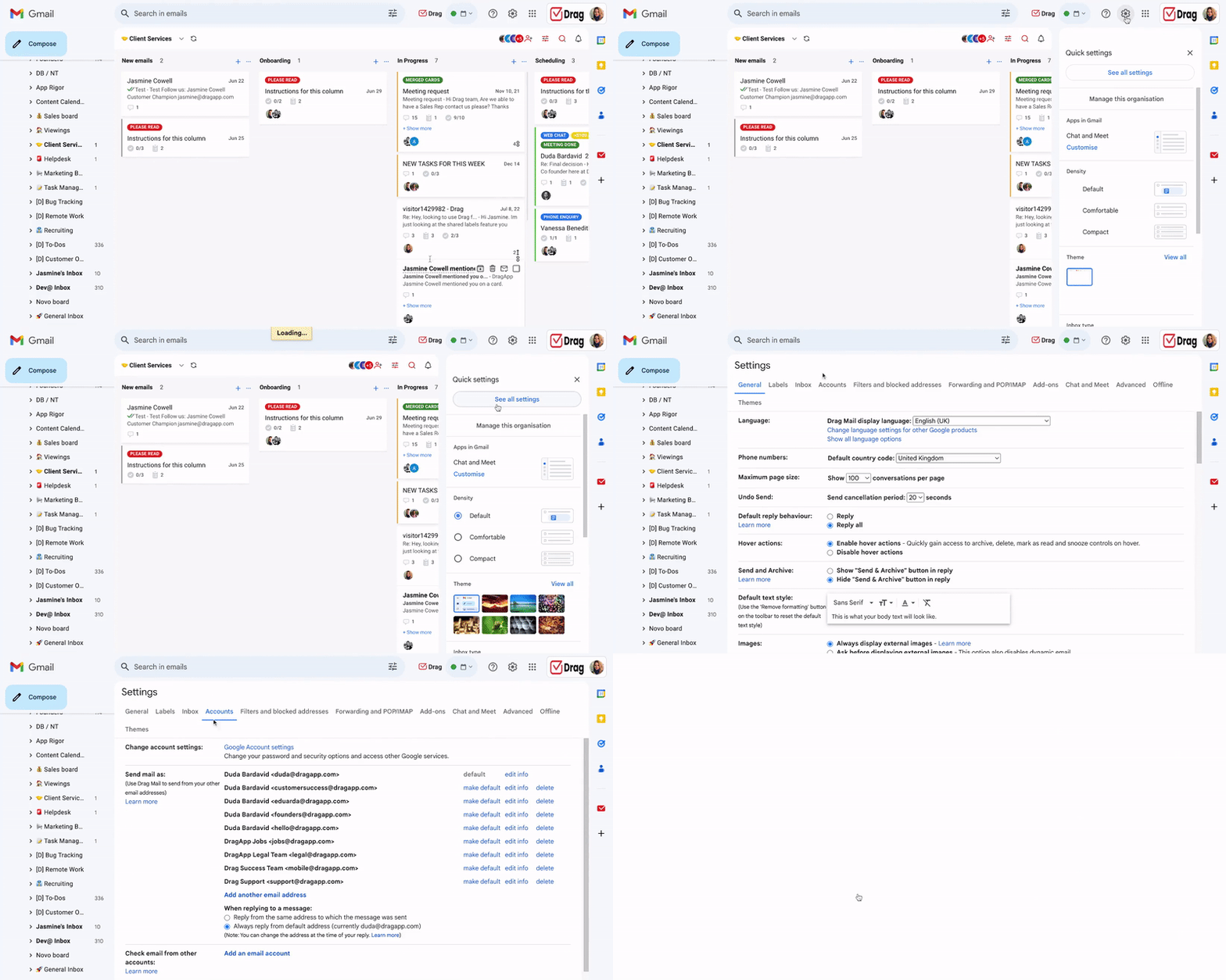
- Enter a name for the secondary account and its address
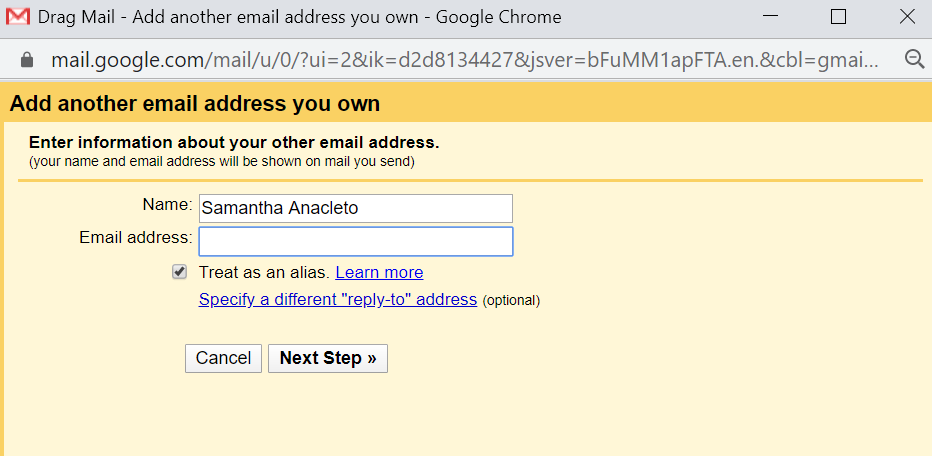
- Check the box treat as an alias to send emails from your primary inbox using your secondary address
- Under Send mail as, choose Reply from the same address the message was sent to
- Send the confirmation email to your secondary account
- On your secondary email account open the email and copy the verification code or click the link
How to start receiving emails from your secondary Gmail on a primary account
- On your secondary Gmail account click the gear icon and choose the tab Forwarding and POP/IMAP
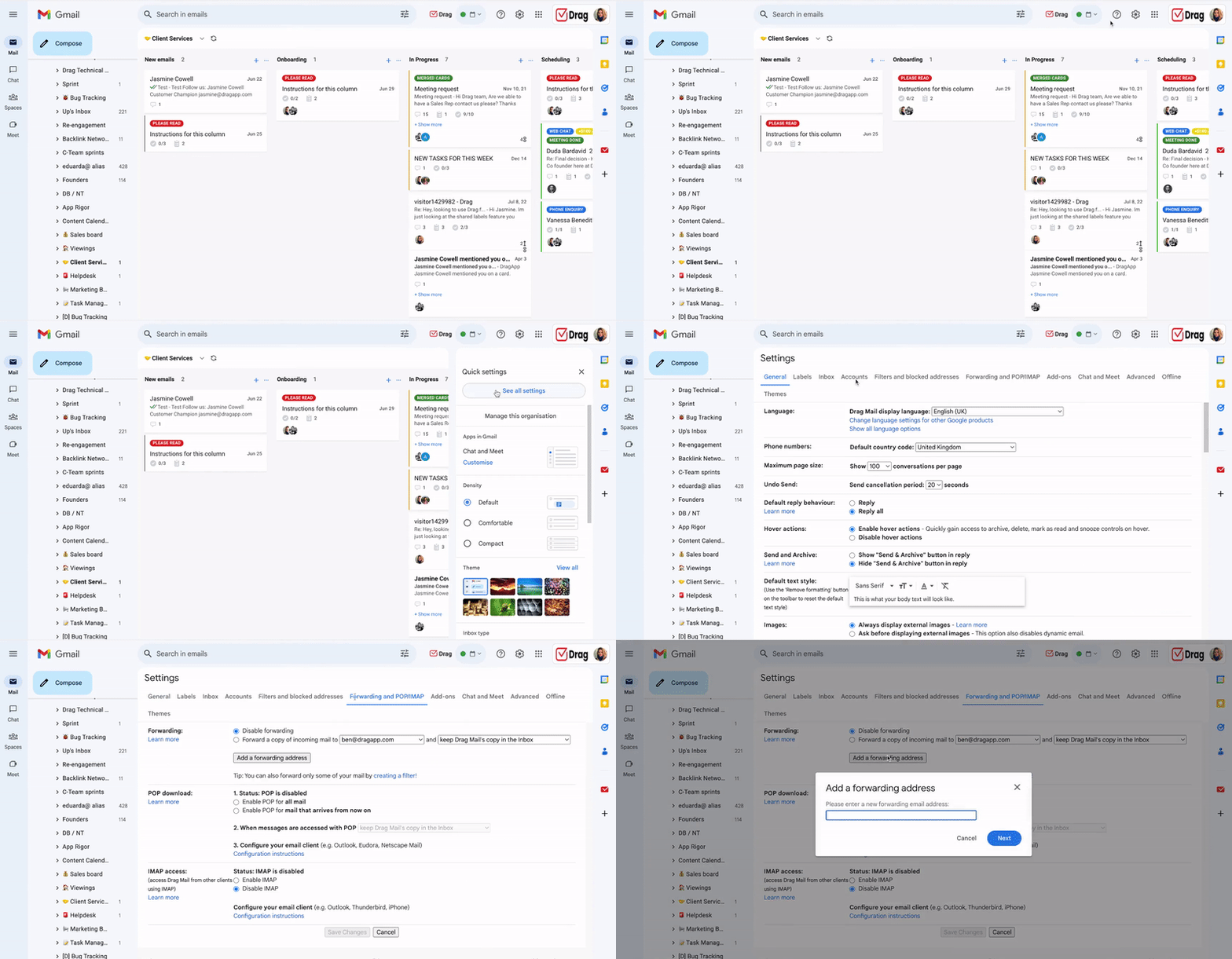
- Find the section Forwarding and click on Add a forwarding address
- On the pop-up type the primary inbox address and click Proceed
- Go to your primary account inbox open the confirmation email and click the link
- Return to the secondary account settings, click the drop-down under Forward a copy of incoming mail to… and select the desired option.
After these steps, you will be able to receive and send emails from your secondary account in your primary inbox. Similar post: Merge Two Google Accounts
Try Drag free. Shared inbox + AI inside Gmail
200,000+ teams use Drag to manage shared emails. 7-day trial, no credit card.
Why pay for Google Workspace if Gmail is free?
There are many things that you don’t get with Gmail that you can access with Google Workspace. For instance, an ad-free software that offers you 30 GB of storage (under the Business Starter plan) and 2 TB of storage (under the Business Standard plan). But if your question is "Is creating a second Gmail account on Google Workspace a better option for professional users?", it's worth mentioning that with Workspace, you can set up professional-looking email addresses branded with your site's domain. Beyond that, a subscription offers:
- An admin console that allows business administrators to centrally manage user accounts, permissions, and security settings. This is efficient for managing employee accounts, onboarding new users, and protecting company data
- Google Meet with more collaboration tools, recording, and a bigger participant count capacity, so that remote and hybrid teams can connect better
- Workspace security features built for enterprises, including phishing and malware protection, data loss prevention (DLP), and controls to protect sensitive information, which are essential for business compliance
- While there are AI resources in Gemini for Gmail, Google Workspace paid plans offer a suite of more powerful, integrated AI tools. This includes automatically generating meeting summaries, drafting documents, and analyzing data in Sheets. Businesses also gain access to more specialized tools and higher usage limits
Is there an alternative to creating a second Gmail account?
Yes, and shared inboxes are the best option. Even though free accounts and Google Workspace can be useful, there are circumstances in which businesses need more than simply a second, third, or fourth Gmail account.
When working in a team, team members usually need something that enables deeper collaboration. For instance: being able to read, reply and manage emails for customer support, sales and other business workflows at once.
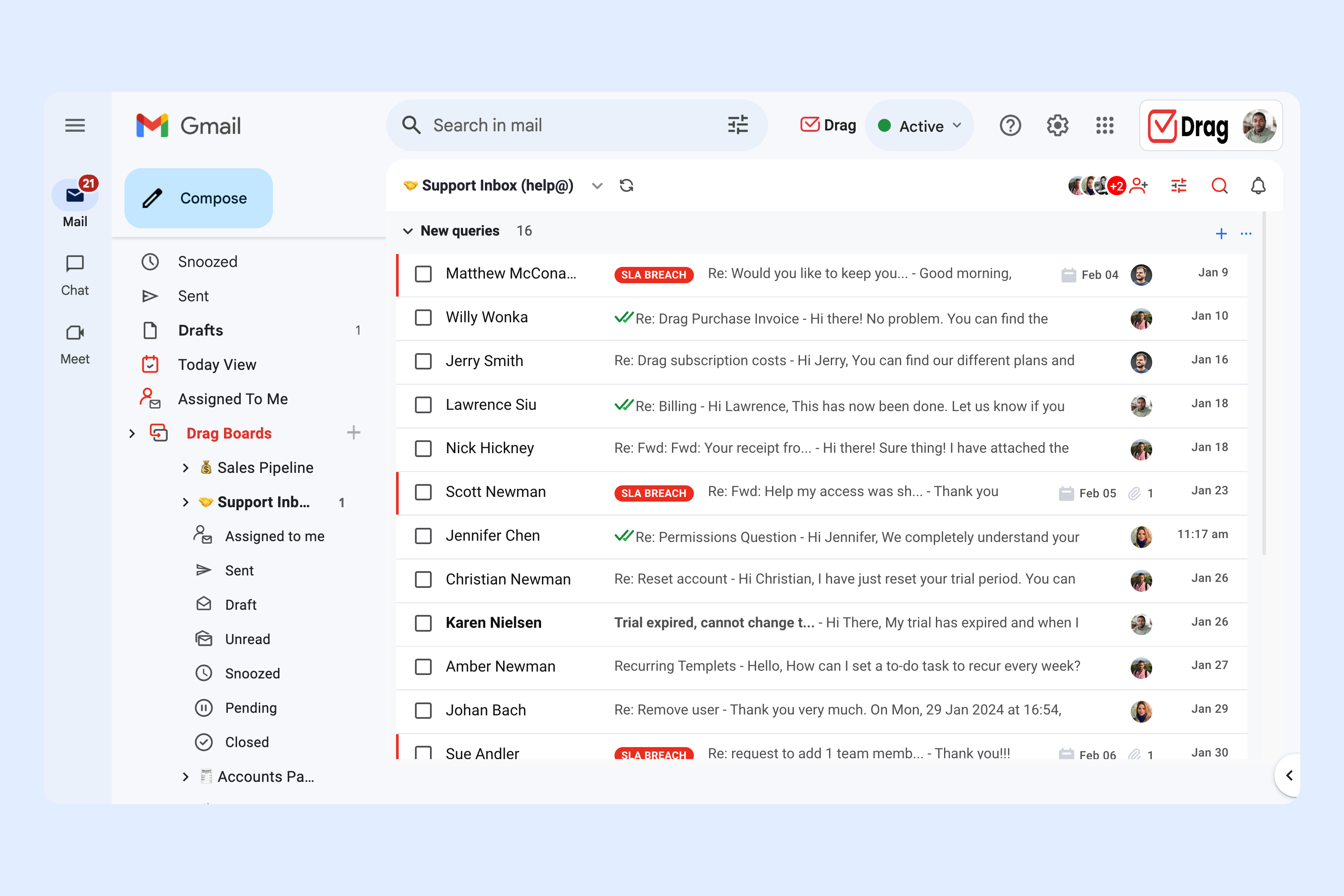
Running an extra Gmail account doesn't quite cut it. If your business is highly Gmail-centric, you need a solution that transforms it into a powerful productivity hub. Here, a shared inbox, like DragApp, can help. Thanks to Drag, you no longer have to run a number of separate Gmail accounts and all can be done from inside Gmail, inside Team Workspaces.
What's the difference between a shared inbox and creating a second Gmail account?
While a Gmail account is the start and end point of your email-based workflow, a shared inbox keeps everything in the same ecosystem.
When you convert your Gmail inbox into a Team Workspace, you can open a conversation, manage tasks, close deals and support customers all in one space.
Your days of switching between a gazillion apps or jumping between multiple Gmail accounts (like to-do apps, CRM, Gmail) will become history. What’s more, you can manage shared inboxes from Gmail, such as help@, info@, sales@, support@.
What other benefits does a shared inbox have?
Drag offers a full suite of features to manage multiple Gmail accounts together. To highlight a few functionalities:
- Aliases: Manage multiple Google Workspace aliases and reply as different email addresses or even on behalf of other team members.
- Shared Inboxes: Manage team inboxes such as sales@ or help@ to manage the most critical business workflows from Gmail.
- Board views: Choose how you want to visualize workflows - kanban, list view or preview view.
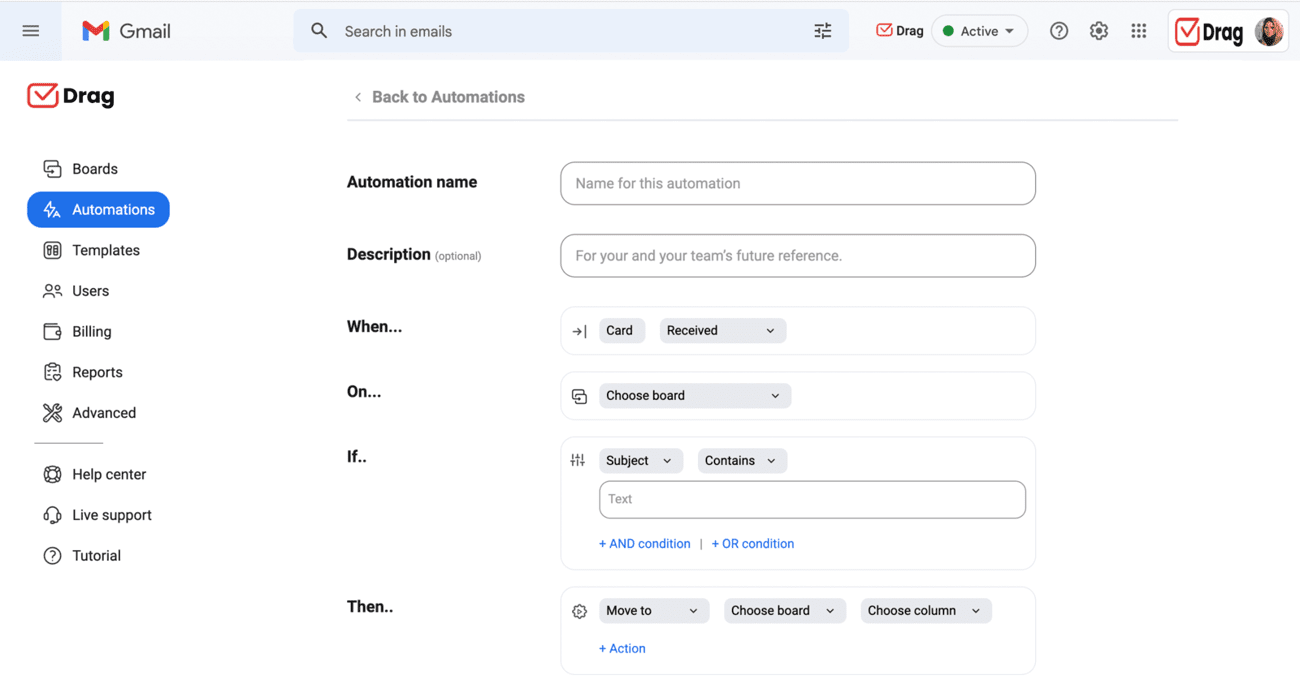
- Automations: Create automation rules to put repetitive tasks across different accounts on autopilot. For example, automatically tag emails if they are sent to a specific email receiver.
Comparing email solutions for teams: free Gmail vs Google Workspace vs DragApp
Wondering whether to stick with a free Gmail, upgrade to Google Workspace, or try DragApp? This comparison breaks down setup, collaboration, automation, and cost so you can choose what works best for you or your team.
| Free Second Gmail Account | Google Workspace Subscription | DragApp Shared Inbox | |
|---|---|---|---|
| Best for | Individual users or small businesses | Companies needing branded email and admin controls | Teams that require collaboration and shared inbox management |
| Setup | Quick setup via Gmail app or web | Requires a Google Workspace account creation | Integrates with existing Gmail/Workspace accounts |
| Email management | Limited to one main account per inbox. Can link secondary to primary | Single-user inbox with Workspace features. Includes admin control panel | Centralized team inboxes managed in one workspace. Has user roles and permissions |
| Collaboration tools | None | Google Meet, Docs, Sheets, and basic AI tools | Built-in workflow management, automations, and task assignment |
| Security and admin controls | Basic Gmail security | Enterprise-level security, phishing/malware protection | Team permissions, shared inbox controls, end-to-end security practices |
| Automation & AI | Standard Gmail features | Integrated AI that connects your work across Workspace tools | Advanced workflow automations, tagging, routing, shared inbox AI features |
| Price | Free | From $7-$22/user/month | Starts at $12/user/month |
How to benefit from a second Gmail account?
Creating a second Gmail account is a simple way to stay organized, separate personal and work emails, and keep your inboxes manageable. With just a few easy steps, you can set up your account, link it to your main inbox, and start sending and receiving emails without hassle. For professionals, Google Workspace adds extra tools and security. However, a dedicated platform, such as a shared inbox, can take your workflow customization even further. By incorporating these solutions and following our setup guide, you'll have better categorization and email management techniques that can further your internal and external communication. That way, your business can thrive easily without any digital clutter.
What you need to know about second Gmail accounts
Creating a second Gmail account helps separate personal and work emails, improves organization, enhances security, and allows better tracking of newsletters, campaigns, or projects. It’s a practical way to manage multiple responsibilities efficiently. Yes. After creating a second account, you can merge emails by going to Settings > Accounts and Import in your primary Gmail. With that, you can import messages, treat the secondary account as an alias, and start sending and receiving emails from a single inbox. Yes, Google Workspace is a better option for most businesses. It offers professional email addresses with your domain, advanced security, collaboration tools, admin controls, and AI features. Shared inbox solutions like DragApp let teams manage multiple Gmail addresses from one workspace. You can assign tasks, use automation, and collaborate without switching between separate accounts, making it more efficient than adding multiple Gmail accounts. To keep your second Gmail account safe, use a strong password, enable two-factor authentication, and avoid sharing login details. For business accounts that are managed by multiple users, consider Google Workspace or shared inbox solutions like DragApp for added security and admin controls. Alternative to creating a second Gmail account.
Frequently asked questions
Why should I create a second Gmail account?
Creating a second Gmail account helps separate personal and work emails, improves organization, enhances security, and allows better tracking of newsletters, campaigns, or projects. It’s a practical way to manage multiple responsibilities efficiently.
Can I link my second Gmail account to my main Gmail inbox?
Yes. After creating a second account, you can merge emails by going to Settings > Accounts and Import in your primary Gmail. With that, you can import messages, treat the secondary account as an alias, and start sending and receiving emails from a single inbox.
Should I use Google Workspace instead of a free Gmail account for business?
Yes, Google Workspace is a better option for most businesses. It offers professional email addresses with your domain, advanced security, collaboration tools, admin controls, and AI features.
What are alternatives to creating multiple Gmail accounts for team use?
Shared inbox solutions like DragApp let teams manage multiple Gmail addresses from one workspace. You can assign tasks, use automation, and collaborate without switching between separate accounts, making it more efficient than adding multiple Gmail accounts.
How do I keep my second Gmail account secure?
To keep your second Gmail account safe, use a strong password, enable two-factor authentication, and avoid sharing login details. For business accounts that are managed by multiple users, consider Google Workspace or shared inbox solutions like DragApp for added security and admin controls.

Nick Timms
Co-founder


